Review & Post-process
Review tab
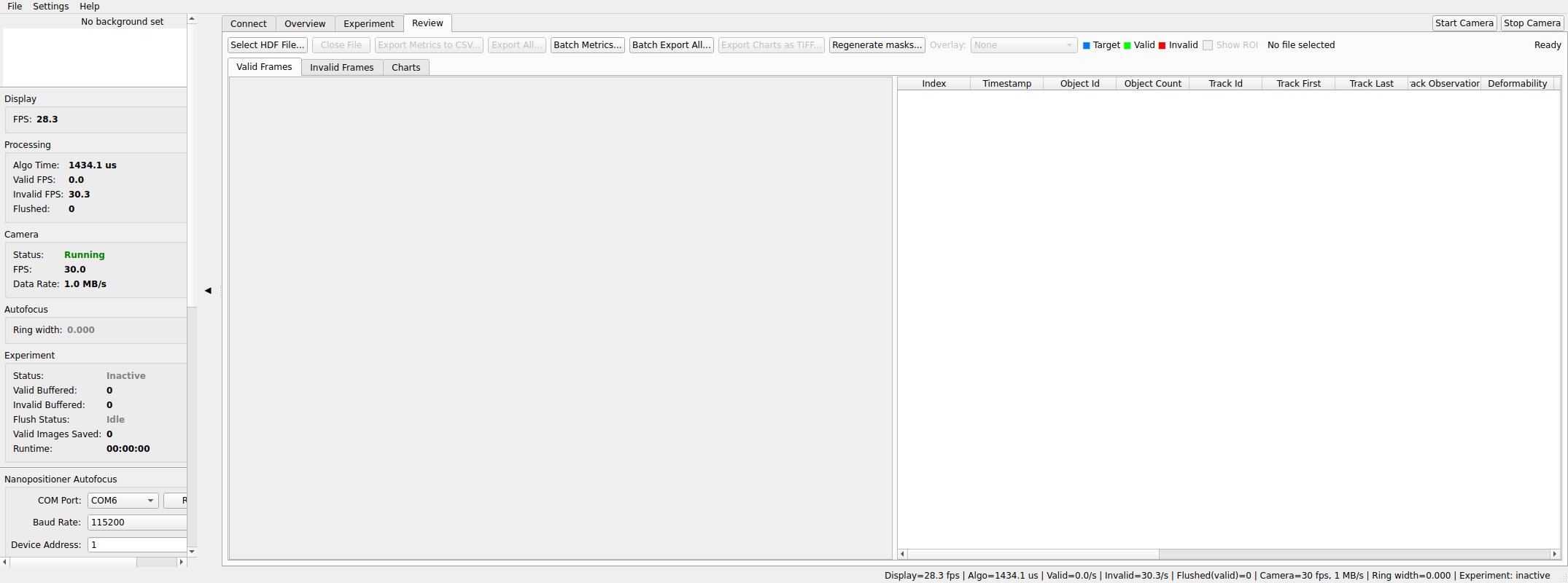
Open a recorded .h5 / .hdf5 file to inspect it without leaving the app.
Files larger than 2 GB are fine — frames load lazily as you browse.
- Browse — thumbnails load incrementally as you scroll; double-click a thumbnail (or a metrics-table row) to open the frame viewer, then use ←/→ to step frames.
- Metrics table — every saved per-frame metric, with optional scatter and histogram charts over the whole dataset. The last column, Young's modulus (kPa), is blank where no modulus is available; the metrics CSV has the same column.
- Charts: find a cell from the scatter — on the Charts tab, click a point on the deformability-vs-area scatter to show that cell in the panel to the right of the plot (it never covers the scatter). The point is ringed in orange and its row is selected in Valid Frames. Use Prev/Next (or ←/→) in the panel to step through frames, and Open in window… for a large view. Scroll to zoom around the pointer (Ctrl: area only, Shift: deformability only), drag to pan, and double-click empty space or right-click → Reset zoom to see the whole run again. Hovering a point shows its frame, area and deformability. Exported chart images always show the whole run without the orange ring.
- Core contour — if the experiment was recorded with Density (KDE) on, its scatter shows the contour that was on screen at Stop as a dashed orange line ("live, provisional"). Right-click the scatter and choose Compute core contour from full run to trace the contour of the densest 90% of all recorded cells (the share set under Monitoring Settings); it is drawn solid blue and saved into the file, after asking before it replaces an earlier one. Close the file in other programs first; if the file cannot be written, the contour is shown but not saved and the status line says so. The saved full-run contour is what From file… in Monitoring Settings uses as the reference for later runs.
- Overlays — mask/contour overlays and the ROI rectangle can be toggled on the loaded frames.
- Close File releases the file handle (do this before moving or deleting the file).
Recordings made in raw recording mode (as opposed to experiments) have no masks or metrics: the tab shows a single Frames list and disables the overlay and metrics exports, but raw TIFF export still works.
Exporting
- Export Metrics — writes
<file>_metrics.csvnext to your chosen location (auto-suffixed_2,_3, … rather than overwriting). - Export FCS… — saves a FlowJo-compatible FCS 3.1 file and a companion
<chosen stem>_event_map.csv, with one event per accepted detection. The export uses the calibration saved in the run. Raw recordings have no object metrics and cannot be exported as FCS. - Export All — writes a folder named after the file containing
metrics.csv, frame TIFFs, and chart images. For multi-image series you are asked whether to export all series frames, a range (e.g.9-15), or skip them. - Batch Export FCS… (under More…) — select several experiment files
and a directory to write one FCS/event-map pair per file. Duplicate names
receive
_2,_3, … suffixes; failures are included in the batch summary. - Batch Metrics / Batch Export All — select several files at once; the batch continues past individual failures and reports a summary.
The last successful output directory is remembered between sessions; FCS and metrics CSV share this setting. Existing FCS or event-map files are refused; choose a new name to preserve both outputs.
Open the .fcs file in FlowJo to gate and plot the image measurements. Channels
follow the processing contract and the members actually stored in the run:
| Channel | Unit | Availability |
|---|---|---|
Area_um2, Area_px2 |
µm², pixels² | Contracts 1–3 |
Deformability, AreaRatio |
unitless | Contracts 1–3 |
RingRatio |
unitless | Contract 1 |
LaplacianVar |
gray² | Contracts 2–3 |
BrightQ1–BrightQ4 |
gray | Contracts 1–2 |
BrightMean, BrightVar |
gray, gray² | Contract 3 |
Pixels, Blemishes |
count | Contract 3 |
Time |
seconds from the first exported event | Contracts 1–3 |
Missing stored members are omitted. These are image measurements, rather than fluorescence or FSC/SSC channels. Images remain in the HDF5 file. The event-map CSV links each FCS event to its source frame, object ID and exact nanosecond timestamp; repeated physical cells can appear in multiple events.
Regenerate masks (reanalyse in-app)
Regenerate masks… re-runs the current processing configuration over the loaded file (a frame range or all of it), an AVI, or a folder of images. The result is written to a new HDF5 file — the original is never modified — and opened in the Review tab. If no background is available, one can be synthesized from the least-changing image tiles.
Use this to rescue an experiment recorded with a bad threshold, or to compare configurations on identical input.
YOFO Review (standalone review app)
YOFO Review is this Review tab as its own app for macOS and Windows, for reviewing recordings on a computer without the instrument. See YOFO Review for installation, updates and how it differs from this tab.
Standalone tools
For working with recordings on machines without the full app (and without Python), two tools ship separately, versioned to match the app — download the zip whose version matches Help ▸ About:
MIB_Studio_Tools_v<version>_windows.zipfromhttps://updates.yofo.bio/stable/tools/(manifest:tools-latest.json).
HDF5 Export (hdf5_export_app.exe, GUI) — export metrics CSV and/or
frame TIFFs from a recording: pick input file, output directory, format
(CSV / images / all), frame type (valid / invalid / both), and the
pixel-to-micron factor.
Reanalyse HDF5 (mib_reanalyse_hdf5.exe, command line) — re-run the
processing pipeline outside the app, saving per-frame intermediate images
(original, blurred, diff, threshold, mask, optional overlay), an optional
metrics.csv, and an optional reanalysis HDF5. Run it with --help for
the full flag list; defaults match the app's processing defaults.
See docs/howto/tools.md
for the full tool reference (developer docs, hosted in the repository).